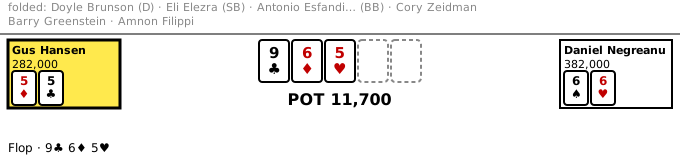
A replay where the reader can take over a seat. If they act as the record did, the record goes on. If they act otherwise, the hand is theirs: the other seats become bots, and the real board is still to come. Here the reader takes Negreanu's seat at the flop of The Hand.
file:// page.Put this line in the page once. Every table on the page shares it.
<script type="module" src="https://cdn.jsdelivr.net/npm/@imperialbower/bowery@0.3.0/bowery.js"></script>
To host it yourself, unpack bowery-vX.Y.Z.tar.gz from a
release into a
folder, for example bowery/, and load
bowery/bowery.js instead. The element loads its wasm from the
same folder.
Write a YAML file. It has five settings, then the whole hand history,
indented two spaces under hand:.
mode: interactive
layout: spotlight
seat: 4
start: flop
hand:
  # pkcore Hand History Format v1
  # "The Hand" — Gus Hansen vs Daniel Negreanu
  # …
  pkcore_version: 0.17.0
  format_version: 1
  hand:
    id: hsp-s2e11-the-hand
    game: holdem
  # …
  players:
  # …
  - seat: 4
    name: Daniel Negreanu
    stack: 387100.0
    hole_cards: 6♠ 6♥
  # … the rest of the players, every action, then the results
seat: 4 is the seat the table suggests. The reader can
pick any seat still in the hand. Seats count from 0.start: flop opens the table when the flop is dealt.layout: spotlight folds the out seats into one strip, so
a two-player hand gets the room.This is a short view. The whole file is the-hand-interactive.yaml. To make one from your own hand history, run this:
{ printf 'mode: interactive\nlayout: spotlight\nseat: 4\nstart: flop\nhand:\n'; sed 's/^/ /' the_hand.yaml; } > the-hand-interactive.yamlOff the record, each other seat is played by pkcore's gto
bot. To pick another bot for a seat, add players at the top
level of the config. A name or stack you give must agree with the hand.
players:
- { seat: 3, bot: maniac }<bowery-table src="the-hand-interactive.yaml"> <img src="the-hand-spotlight.svg" alt="The Hand on the flop."> </bowery-table>
src is the config file. It must be on the same site as the
page.base="bowery/".To make a still picture for the fallback, run this in a clone of bowery:
cargo run --example bowery-still -- the-hand-interactive.yaml --at flop > the-hand-spotlight.svg
python3 -m http.server 8000
bowery-still --odds prints. controls: { odds: false } drops the button only; the percents stay.| Field | Values | What it does |
|---|---|---|
mode | interactive | A replay the reader can take over. Needed. |
hand | a hand history | The recorded hand. Needed. |
seat | 0 to 9 | The suggested seat. |
start | preflop, flop, turn, river, showdown, or a number | Where the table opens. |
layout | ring, spotlight, ledger | How the table is drawn. Default ring. |
view | all, seat | All hole cards up (default), or only those of seat. |
players | a list of { seat, bot } | The bot for a seat off the record. Default gto. |
seed | a number | Seeds the bots, so the same choices give the same hand. |
controls.odds | true, false | Show the % button. Default: shown when the view is all. |
delay_ms | a number | Milliseconds between bot moves. Default 700. |
Every field: Config on docs.rs.
Two events tell the page what the reader did:
document.addEventListener('bowery:off-record', (event) => {
  console.log(event.target.id, 'left the record at moment', event.detail.since);
});
document.addEventListener('bowery:hand-over', (event) => {
  console.log(event.target.id, 'hand over', event.detail.result);
});
This page's events: